A real local WordPress.
Not a container pretending to be one.
SiteShift runs each site on static PHP and MySQL binaries in ~/.siteshift — no Docker Desktop, no VM, nothing touching your system PHP. The files are plain files, the database is a real MySQL on a local port, and WP-CLI is already there.
PHP 8.2–8.5 per site · MySQL 8.4 on 127.0.0.1:13306 · files under ~/.siteshift/sites
The parts you'd set up by hand, already set up
Nothing here is a stripped-down preview. It's the stack your host runs, on your own machine.
Static PHP, per site
PHP 8.2, 8.3, 8.4 or 8.5 — pick per site, switch any time. Binaries are downloaded once, checksum-verified, and shared between sites.
A real MySQL 8.4
One managed MySQL on 127.0.0.1:13306, a separate database and user per site. Connect TablePlus, HeidiSQL, Sequel Ace or mysql directly — no container to tunnel through.
Files where your editor expects them
Every site lives under ~/.siteshift/sites/
WP-CLI, bundled
wp-cli.phar runs under each site's own PHP version. SiteShift uses it for installs and URL rewrites; you use it for everything else.
One-time admin login
A mu-plugin issues a single-use login link, so you're in wp-admin without remembering which password you set on which site.
Live task log
Installs, pulls and pushes stream their progress to the app. When something fails, you see the command that failed, not a spinner.
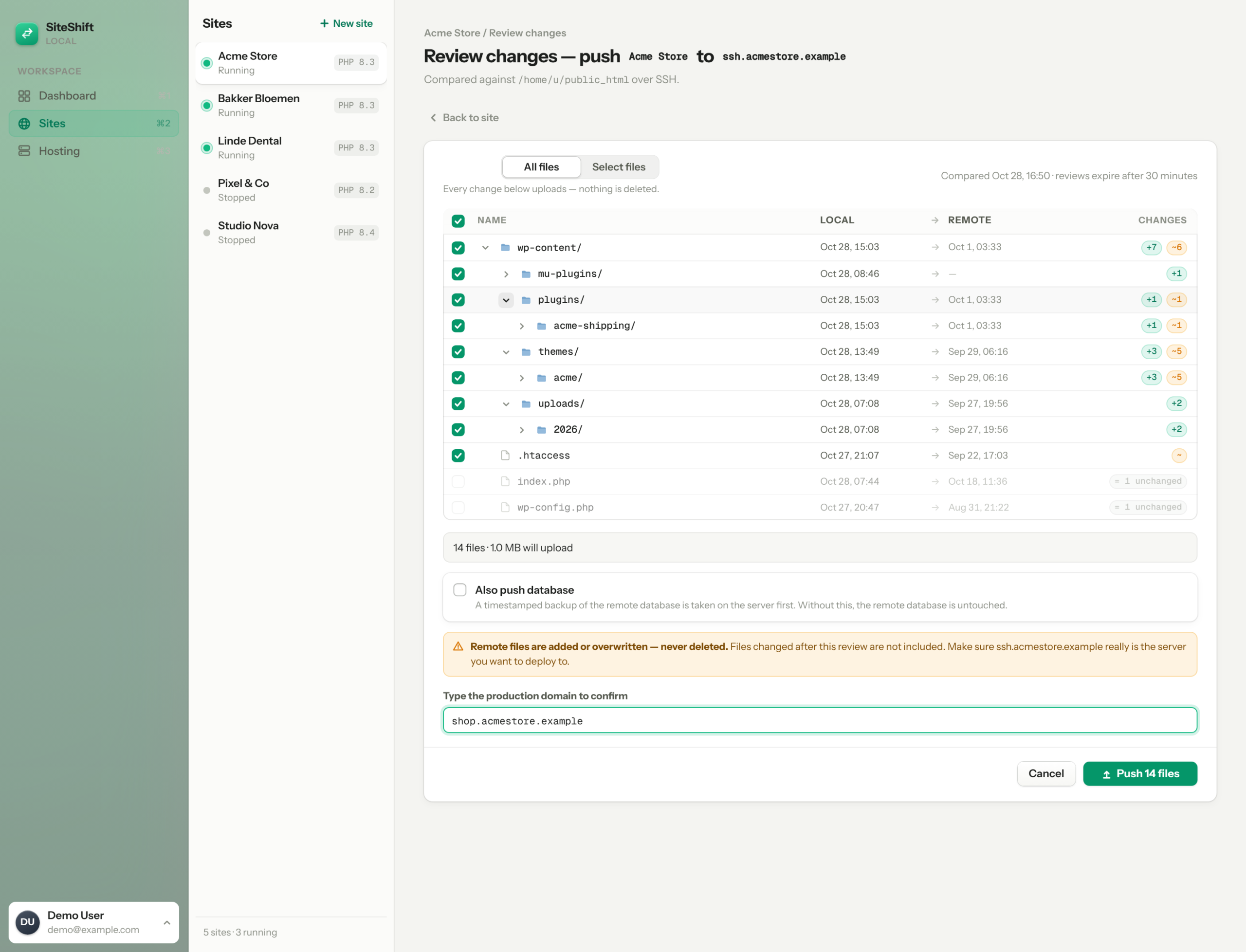
Push is a review, not a leap
SSH/SFTP with phpseclib — password or private key, any port — and a diff before anything moves.
A diff of every file, then an add-only upload.
Before a push, SiteShift diffs your webroot against the remote and shows you the tree: new, modified, remote-only. You choose what goes. The selection is packed with tar, uploaded over SFTP, unpacked on the server. Remote-only files are never touched; wp-config.php is never sent.
- Typed-domain confirm gate before the transfer starts
- Excludes macOS resource forks and wp-config.php automatically
- Progress and every command in the task log
Backup first. Rewrite on export. Then import.
Include the database and SiteShift dumps the remote one first — to ~/siteshift-backups on the server and to your machine — and checks the backup's size before going on. Your database is exported with wp search-replace from the local URL to the production URL, serialized values included, and imported over the wire.
- Backup verified before any import runs
- wp search-replace --all-tables-with-prefix on export
- Pull does the reverse: production URL → local URL, http and https
What we left out, and why.
No Docker. Static binaries start faster, don't need a daemon, and don't fight your other containers.
No Node in the app. The dashboard is server-rendered Symfony with AssetMapper; your project can use whatever build tooling it likes.
No hosting, no cloud. The only network call SiteShift makes on its own is licence validation. Your sites and secrets stay on your machine in an encrypted vault.
No CLI yet. SiteShift is a desktop app first. A scriptable CLI and an MCP server for AI agents are on the roadmap — if that's what you're waiting for, say so and we'll tell you when.
Developer questions
No. SiteShift's binaries live in ~/.siteshift/bin (your user folder on Windows) and are invoked by full path. Your system PHP is never touched.
Yes — host 127.0.0.1, port 13306, credentials on the site's info card.
A pull copies the files it finds on the remote and overwrites the local webroot. If you keep a theme in git, commit before pulling and treat the pull as a content refresh, not a merge.
macOS on Apple Silicon (M1 or later) and Windows 10/11 on x64. Intel Macs aren't supported yet: the bundled macOS builds are arm64.
A Symfony 7.4 dashboard packaged with Tauri v2 and a FrankenPHP static binary; per-site php -S on a local port with
Real PHP. Real MySQL. Your editor. €9 a month.
Download SiteShift